WhatsApp marketing, automation & AI

Turn WhatsApp into your best salesperson.

Campaigns, chatbots, AI agents and visual automation for WhatsApp, in one simple dashboard.

7-day free trial. Monthly or yearly plans. 30-day money-back guarantee on your first payment.

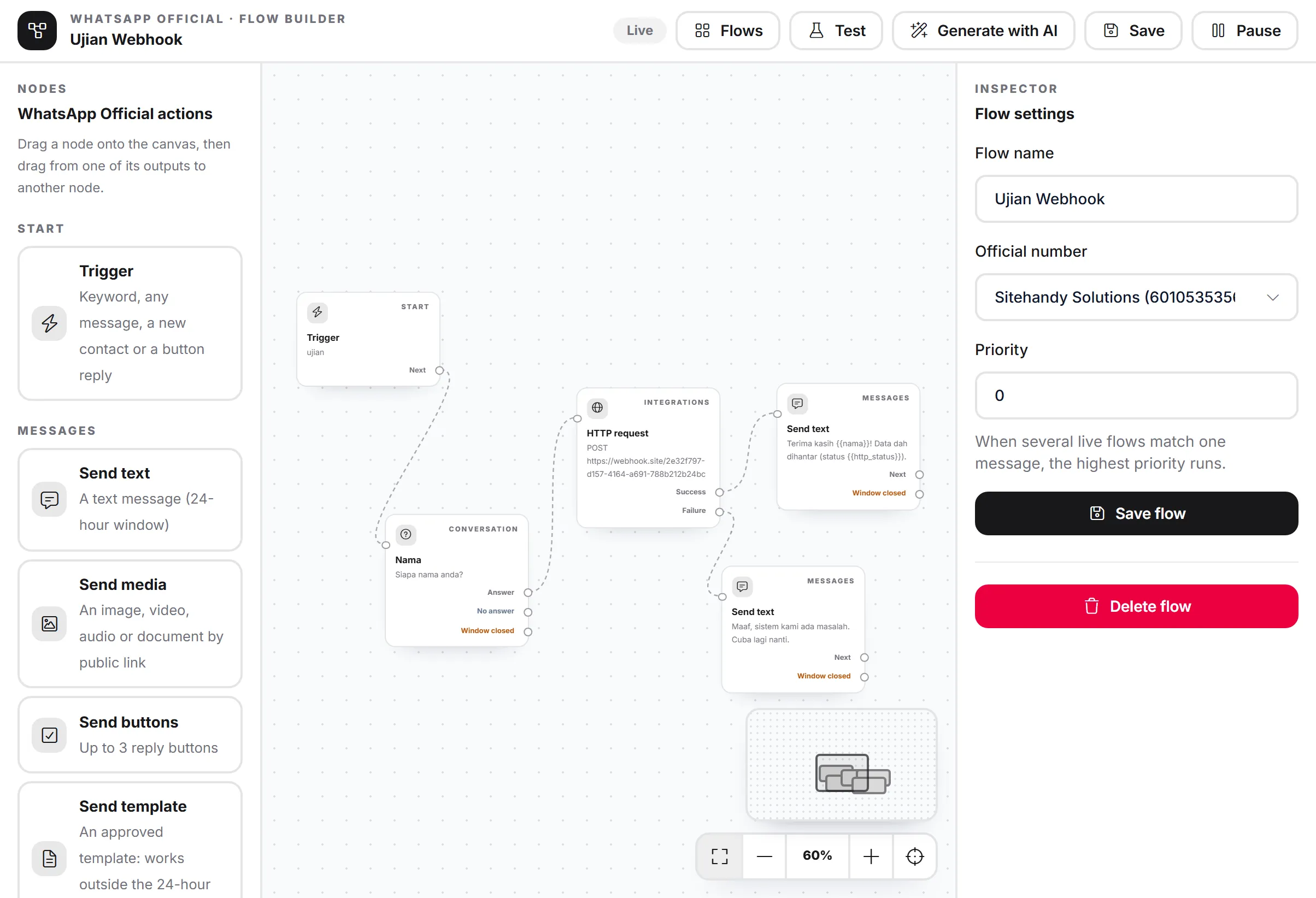
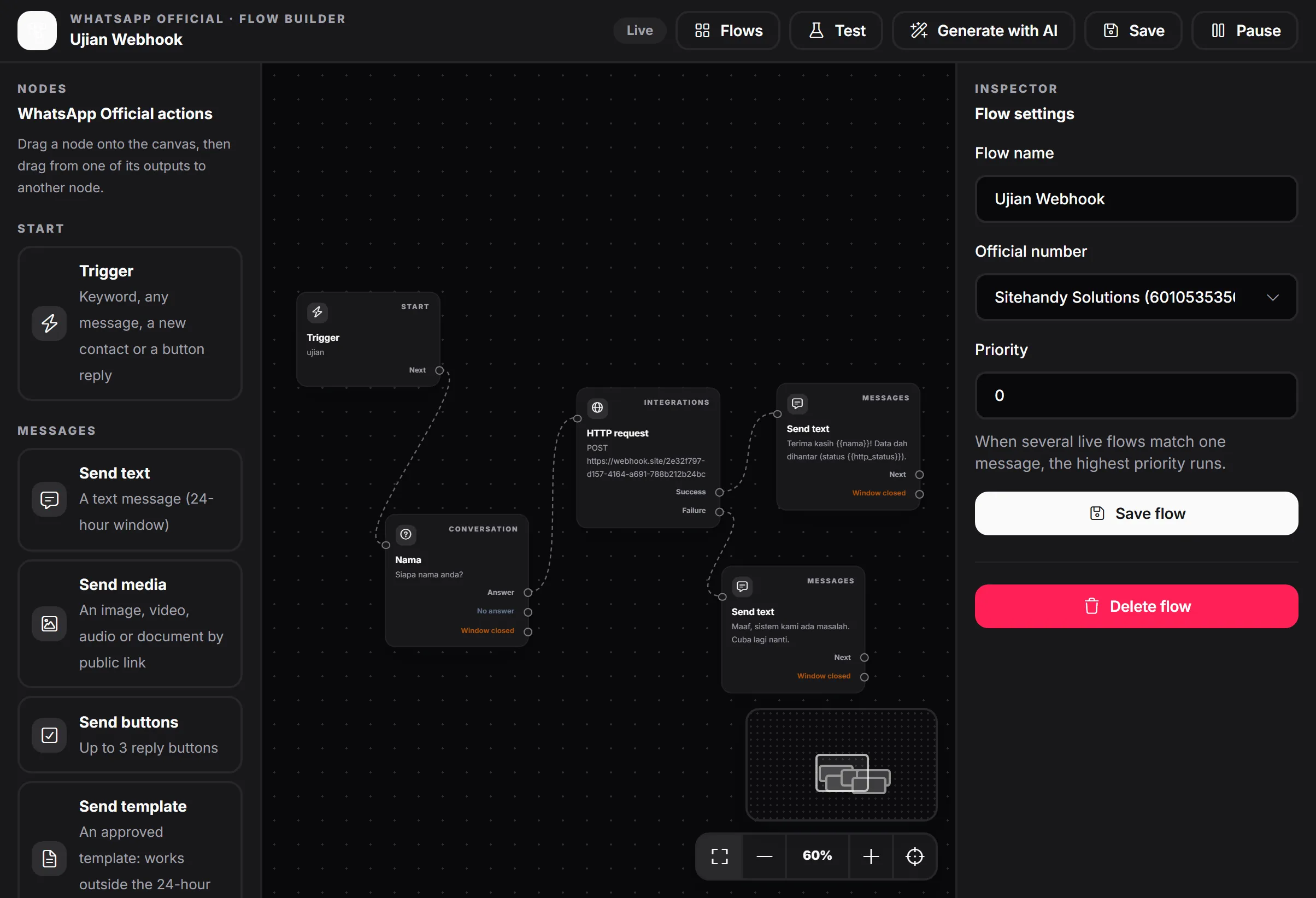
The MacroWA flow builder with a trigger, a question, an HTTP request and reply nodes on a canvasThe MacroWA flow builder with a trigger, a question, an HTTP request and reply nodes on a canvas
Your storeAI agent on

Hi, is the linen shirt still available in size M?

Yes, size M is in stock. Here it is:

Linen shirt, sage

You can order it here: yourstore.my/linen-shirt

Great, ordering now. Thanks!

Example conversation
Staff replied. Bot paused for this chat.
STOP received. Contact opted out.

01What changes

Less busywork. More replies.

  1. 01

    Reply in seconds, 24/7

    AI agents and chatbots answer customers instantly, day and night.

  2. 02

    Automate the busywork

    Visual flows ask questions, save answers, branch on conditions and call your other systems.

  3. 03

    Reach customers at scale

    Campaigns, broadcasts and approved templates, with delivery and read tracking.

  4. 04

    Stay in control

    Opt-in and opt-out handling, team roles, a human hand-off and clear reports.

02Two ways to connect

Scan and go, or go official.

Both options live in the same dashboard, so you can start with one and add the other later.

Quick start with a QR code

Connect one or more WhatsApp numbers by scanning a QR code, and start messaging, automating and running campaigns in minutes.

  • Several numbers in one dashboard, with live connection status
  • Bulk campaigns with random delays, quiet hours and scheduling
  • Auto reply, chatbot and AI Smart Reply
  • The bot pauses when your staff reply
All messaging features

Meta WhatsApp Business Platform

Official WhatsApp Business API

Meta's verified platform for approved templates, high volume and green-tick eligibility. Connect in a few clicks through Meta's own sign-up window.

  • Embedded Signup, with coexistence on the WhatsApp Business App
  • Quality rating and messaging limit tier at a glance
  • Template approvals, broadcasts and a shared inbox
  • WhatsApp Flows forms for sign-ups and bookings

Official WhatsApp Business API messaging fees are billed by Meta directly. MacroWA plans cover platform features.

About the official API

03Automation

Build conversations that think for themselves.

Design WhatsApp journeys on a drag-and-drop canvas. Every question, condition and request has its own paths, so each customer gets the reply that fits their situation.

Start

Trigger

Keyword: "price"

Conversation

Ask a question

Which size do you need?

  • Answer
  • No answer

Integrations

HTTP request

Send the lead to your CRM

  • Success
  • Failure

AI

AI reply

Answer from your product list

Team

Hand off

Pass the chat to staff

04AI agents

An AI salesperson that knows your business.

Create several AI agents, one per brand or product line, and assign them to each WhatsApp number. Test any agent in the built-in "Try the agent" panel before it talks to customers.

How the AI works
Example agent
Role
Friendly sales assistant for a clothing store. Replies in Bahasa Melayu or English.
Constraints
Never offer discounts. Hand over to staff when unsure.
Knowledge
Products, prices, sizes, delivery FAQ
Media library
Product photos, size chart (PDF)
Links
Store, order form
Knowledge URLs
yourstore.my/faq, read daily

05How it works

From scan to first reply in three steps.

  1. Step 1

    Connect your WhatsApp number

    Scan a QR code, or connect the official WhatsApp Business API.

  2. Step 2

    Teach your AI agent

    Add your products, prices, FAQs, images, links and website pages.

  3. Step 3

    Turn on automation

    Switch on your flows and watch the replies roll in.

06Developers

Plug WhatsApp into your own systems.

A REST API with Bearer keys, idempotency keys and signed webhooks for incoming messages and delivery status.

Read the developer overview
POST /api/v1/whatsapp-official/messages
curl -X POST 'https://dash.macrowa.com/api/v1/whatsapp-official/messages' \
  -H 'Authorization: Bearer YOUR_API_KEY' \
  -H 'Accept: application/json' \
  -H 'Content-Type: application/json' \
  -H 'Idempotency-Key: order-1001-ready' \
  -d '{
    "number_id": 1,
    "to": "60123456789",
    "type": "text",
    "payload": {
        "text": "Your order is ready."
    }
}'

07Questions

Asked before you sign up.

All questions
What is the difference between the QR-code option and the official WhatsApp Business API?

The QR-code option is the fastest way to start: scan and go. The official API is Meta's verified platform for businesses that need approved templates, high volume and green-tick eligibility. MacroWA supports both.

Do I need a developer?

No. Setup, the AI agents and the flow builder are all point-and-click. The API is there if you want to integrate.

Can the AI answer in Bahasa Melayu?

Yes. Set the agent's language and tone in its role, and it replies using your own knowledge.

What happens when my staff want to take over a chat?

Just reply. MacroWA pauses the bot for that customer automatically, so your staff and the bot never talk over each other.

Ready to grow on WhatsApp? Start with MacroWA today.

Connect a number, teach your AI agent and switch on your first flow.

7-day free trial. Monthly or yearly plans. 30-day money-back guarantee on your first payment.